Azure High-Availability ARM Template
Purpose: Deploy StorageLink BYOL in a highly available configuration on Azure using an ARM template
Architecture: VM Scale Set (autoscales 2–10 VMs on CPU) + Load Balancer + PostgreSQL Flexible Server + VNet + Key Vault
Prerequisites: Accept the StorageLink BYOL image terms once per subscription: az vm image terms accept --publisher thorntechnologiesllc --offer storagelink-byol --plan storagelink-byol
Deployment:
- In Azure Cloud Shell (Bash), create
storagelink-arm.jsonandparameters.jsonwith your IP range (iprange), SSH public key (pubKey) and web admin credentials - Run
az deployment group create --resource-group <group> --template-file storagelink-arm.json --parameters @parameters.json(about 10 minutes) - Sign in at the load balancer's public IP and start the free 30-day trial in the admin UI — one trial licenses every VM
Access: SSH through the load balancer's NAT ports 2222–2322, which map to port 22 on each VM
Product: StorageLink by Thorn Technologies — cloud storage gateway for secure file sharing
Overview
You can launch an HA configuration of StorageLink using an Azure Resource Manager (ARM) template. High-availability requires additional resource types like a database, load balancer, and scale set. The ARM template coordinates the provisioning of these resources.
These instructions are for provisioning StorageLink 1.3.0 from the StorageLink BYOL listing. The BYOL listing has no software charge — you pay only for the Azure resources the template creates. After you deploy, you start a free 30-day trial from the admin UI, and when you're ready, book a 15-minute call to purchase a license.
Before you begin: accept the StorageLink BYOL terms
Azure requires each subscription to accept a Marketplace image's terms before a template can create VMs from it. Until you do, the deployment fails with ResourcePurchaseValidationFailed. Accept the StorageLink BYOL terms once, for example in Cloud Shell:
az vm image terms accept --publisher thorntechnologiesllc --offer storagelink-byol --plan storagelink-byol
To deploy the Standard (pay-as-you-go) listing, set the scale set's plan to "name": "storagelink" and "product": "storage-link", set its imageReference to "offer": "storage-link" and "sku": "storagelink", and accept that plan's terms (--offer storage-link --plan storagelink). The Standard listing bills a $0.08 USD/hour software fee per VM through Azure, licenses itself automatically, and supports up to 10 StorageLink users. See StorageLink Standard vs BYOL.
Navigating to the command line interface
In the Azure Portal, you should see the Cloud Shell icon at the top of your screen, to the right of the search bar. Click this to open up the command line console.
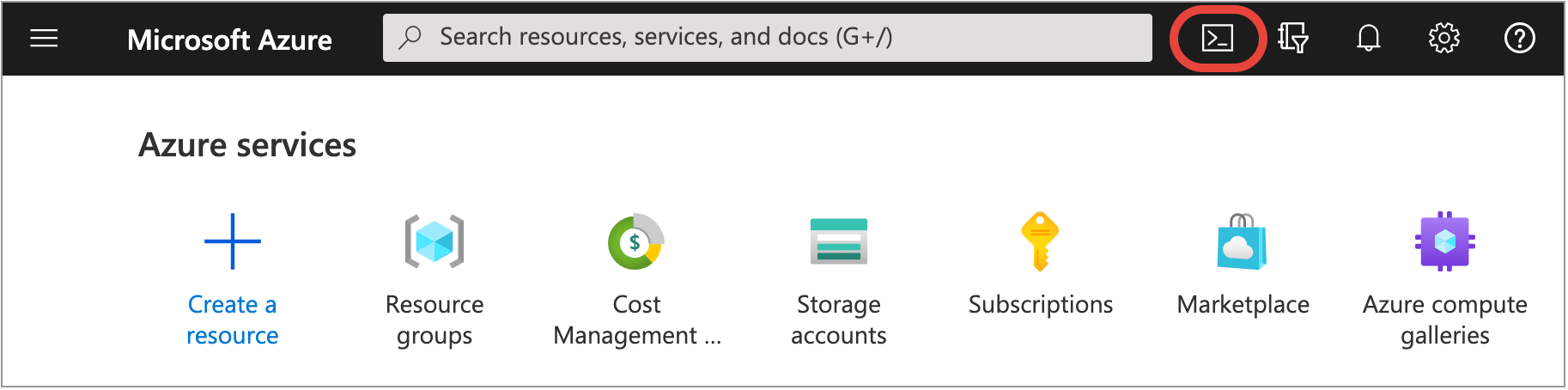
You will be prompted to chose between a Bash shell or a PowerShell environment. If it is your first time opening the command line interface, you may be prompted to choose a Storage Account to store any files you create.
Most of the examples in this article will be using Bash.
Create an ARM template
Create a file named storagelink-arm.json in the Bash shell with the command:
touch storagelink-arm.json
Then use your favorite command line text editor to edit the file:
nano storagelink-arm.json
Paste in the following contents (be careful, it is very long):
{
"$schema": "https://schema.management.azure.com/schemas/2019-04-01/deploymentTemplate.json#",
"contentVersion": "1.0.0.0",
"parameters": {
"location": {
"type": "string",
"defaultValue": "[resourceGroup().location]"
},
"iprange": {
"type": "string",
"metadata": {
"description": "IP address range, followed by /32"
}
},
"linuxAdminUsername": {
"type": "string",
"defaultValue": "ubuntu",
"metadata": {
"description": "Linux admin username"
}
},
"pubKey": {
"type": "string",
"metadata": {
"description": "SSH public key"
}
},
"vmSize": {
"type": "string",
"defaultValue": "Standard_B1ms",
"allowedValues": [
"Standard_B1s",
"Standard_B1ms",
"Standard_B2s",
"Standard_D2as_v4",
"Standard_D8s_v4"
],
"metadata": {
"description": "Size of VM"
}
},
"webAdminUsername":{
"type": "string",
"metadata": {
"description": "Optionally use this parameter and WebAdminPassword to initialize a username to log into web admin interface."
},
"defaultValue": ""
},
"webAdminPassword":{
"type": "string",
"metadata": {
"description": "Optionally use this parameter and WebAdminUsername to initialize a password to log into web admin interface. This password could show in cloud-init configuration logs. We recommend changing the password after logging in with the admin account to prevent a possible password leak."
},
"defaultValue": ""
},
"randomSeed": {
"type": "string",
"defaultValue": "[newGuid()]"
}
},
"variables": {
"location": "[parameters('location')]",
"pubKey": "[parameters('pubKey')]",
"diagStorageAccountName": "[concat('swiftgwdiag', uniqueString(resourceGroup().id, deployment().name, parameters('randomSeed')))]",
"virtualNetworkName": "swiftgw-vnet",
"addressPrefix": "10.0.0.0/16",
"subnetPrefix": "10.0.0.0/24",
"subnetPrivatePrefix": "10.0.1.0/24",
"privateDnsName": "private.postgres.database.azure.com",
"instanceCount": 2,
"dbPassword": "[concat(uniqueString(concat(guid(resourceGroup().id, deployment().name), parameters('randomSeed'))), uniqueString(parameters('randomSeed')))]",
"dbUsername": "swiftgw",
"logGroupName": "logGroup",
"identityName": "swiftgw-instance-identity",
"roleDefinitionId": "b24988ac-6180-42a0-ab88-20f7382dd24c",
"dbName": "[concat('swiftgw-db-', uniqueString(resourceGroup().id, deployment().name, parameters('randomSeed')))]",
"dbEndpoint": "[concat(variables('dbName'), '.postgres.database.azure.com')]",
"roleAssignmentName": "[guid(variables('identityName'), variables('roleDefinitionId'), resourceGroup().id, deployment().name)]",
"keyVaultName": "[concat('swiftgw-kv-', uniqueString(resourceGroup().id, deployment().name, parameters('randomSeed')))]",
"keyVaultDbPasswordSecretName": "dbPassword",
"vmNamePrefix": "swiftgw-",
"vmNicPrefix": "swiftgw-nic",
"loadBalancerName": "swiftgw-lb",
"nsgName": "swiftgw-default-nsg",
"scaleSetName": "swiftgw-scale-set",
"ipName": "swiftgw-ip",
"natPoolName": "swiftgw-natpool",
"natStartPort": 2222,
"natEndPort": 2322
},
"resources": [
{
"type": "Microsoft.ManagedIdentity/userAssignedIdentities",
"apiVersion": "2018-11-30",
"name": "[variables('identityName')]",
"location": "[variables('location')]",
"properties": {}
},
{
"type": "Microsoft.KeyVault/vaults",
"apiVersion": "2021-10-01",
"name": "[variables('keyVaultName')]",
"location": "[variables('location')]",
"dependsOn": [
"[resourceId('Microsoft.ManagedIdentity/userAssignedIdentities', variables('identityName'))]"
],
"properties": {
"enabledForDeployment": true,
"enabledForTemplateDeployment": true,
"enabledForDiskEncryption": true,
"tenantId": "[subscription().tenantId]",
"accessPolicies": [
{
"objectId": "[reference(variables('identityName')).principalId]",
"tenantId": "[reference(variables('identityName')).tenantId]",
"permissions": {
"secrets": [ "get", "list" ]
}
}
],
"sku": {
"name": "standard",
"family": "A"
},
"networkAcls": {
"defaultAction": "Allow",
"bypass": "AzureServices"
}
}
},
{
"type": "Microsoft.KeyVault/vaults/secrets",
"apiVersion": "2021-10-01",
"name": "[format('{0}/{1}', variables('keyVaultName'), variables('keyVaultDbPasswordSecretName'))]",
"properties": {
"value": "[variables('dbPassword')]"
},
"dependsOn": [
"[resourceId('Microsoft.KeyVault/vaults', variables('keyVaultName'))]"
]
},
{
"type": "Microsoft.Network/networkSecurityGroups",
"apiVersion": "2020-11-01",
"name": "[variables('nsgName')]",
"location": "[variables('location')]",
"properties": {
"securityRules": [
{
"name": "admin-ports",
"properties": {
"protocol": "TCP",
"sourcePortRange": "*",
"destinationAddressPrefix": "*",
"access": "Allow",
"priority": 1010,
"direction": "Inbound",
"sourcePortRanges": [],
"destinationPortRanges": [
"22"
],
"sourceAddressPrefixes": [
"[parameters('iprange')]"
],
"destinationAddressPrefixes": []
}
},
{
"name": "default-allow-web",
"properties": {
"protocol": "TCP",
"sourcePortRange": "*",
"destinationPortRanges": [
"80",
"443"
],
"sourceAddressPrefix": "*",
"destinationAddressPrefix": "*",
"access": "Allow",
"priority": 1000,
"direction": "Inbound",
"sourcePortRanges": [],
"sourceAddressPrefixes": [],
"destinationAddressPrefixes": []
}
}
]
}
},
{
"type": "Microsoft.Network/publicIPAddresses",
"apiVersion": "2021-03-01",
"name": "[variables('ipName')]",
"location": "[variables('location')]",
"properties": {
"publicIPAddressVersion": "IPv4",
"publicIPAllocationMethod": "Static",
"idleTimeoutInMinutes": 4
}
},
{
"type": "Microsoft.Network/virtualNetworks",
"apiVersion": "2020-05-01",
"name": "[variables('virtualNetworkName')]",
"location": "[variables('location')]",
"properties": {
"addressSpace": {
"addressPrefixes": [
"[variables('addressPrefix')]"
]
},
"subnets": [
{
"name": "default",
"properties": {
"addressPrefix": "[variables('subnetPrefix')]"
}
},
{
"name": "private-1",
"properties": {
"addressPrefix": "[variables('subnetPrivatePrefix')]",
"serviceEndpoints": [
{
"service": "Microsoft.Storage",
"locations": [
"[variables('location')]"
]
}
],
"delegations": [
{
"name": "Microsoft.DBforPostgreSQL.flexibleServers",
"properties": {
"serviceName": "Microsoft.DBforPostgreSQL/flexibleServers"
}
}
],
"privateEndpointNetworkPolicies": "Enabled",
"privateLinkServiceNetworkPolicies": "Enabled"
}
}
]
}
},
{
"type": "Microsoft.Network/virtualNetworks/subnets",
"apiVersion": "2021-03-01",
"name": "[concat(variables('virtualNetworkName'), '/default')]",
"dependsOn": [
"[resourceId('Microsoft.Network/virtualNetworks', variables('virtualNetworkName'))]"
],
"properties": {
"addressPrefix": "[variables('subnetPrefix')]",
"delegations": [],
"privateEndpointNetworkPolicies": "Enabled",
"privateLinkServiceNetworkPolicies": "Enabled"
}
},
{
"type": "Microsoft.Network/virtualNetworks/subnets",
"apiVersion": "2021-03-01",
"name": "[concat(variables('virtualNetworkName'), '/private-1')]",
"dependsOn": [
"[resourceId('Microsoft.Network/virtualNetworks', variables('virtualNetworkName'))]"
],
"properties": {
"addressPrefix": "[variables('subnetPrivatePrefix')]",
"serviceEndpoints": [
{
"service": "Microsoft.Storage",
"locations": [
"[variables('location')]"
]
}
],
"delegations": [
{
"name": "Microsoft.DBforPostgreSQL.flexibleServers",
"properties": {
"serviceName": "Microsoft.DBforPostgreSQL/flexibleServers"
}
}
],
"privateEndpointNetworkPolicies": "Enabled",
"privateLinkServiceNetworkPolicies": "Enabled"
}
},
{
"type": "Microsoft.Network/privateDnsZones",
"apiVersion": "2020-01-01",
"name": "[variables('privateDnsName')]",
"location": "global"
},
{
"type": "Microsoft.Network/privateDnsZones/virtualNetworkLinks",
"apiVersion": "2020-06-01",
"name": "[concat(variables('privateDnsName'), '/', format('{0}-link', variables('virtualNetworkName')))]",
"location": "global",
"dependsOn": [
"[resourceId('Microsoft.Network/privateDnsZones', variables('privateDnsName'))]",
"[resourceId('Microsoft.Network/virtualNetworks', variables('virtualNetworkName'))]"
],
"properties": {
"registrationEnabled": false,
"virtualNetwork": {
"id": "[resourceId('Microsoft.Network/virtualNetworks', variables('virtualNetworkName'))]"
}
}
},
{
"type": "Microsoft.DBforPostgreSQL/flexibleServers",
"apiVersion": "2021-06-01",
"name": "[variables('dbName')]",
"location": "[variables('location')]",
"dependsOn": [
"[resourceId('Microsoft.Network/privateDnsZones/virtualNetworkLinks', variables('privateDnsName'), format('{0}-link', variables('virtualNetworkName')))]"
],
"sku": {
"name": "Standard_B1ms",
"tier": "Burstable"
},
"properties": {
"version": "16",
"administratorLogin": "[variables('dbUsername')]",
"administratorLoginPassword": "[variables('dbPassword')]",
"availabilityZone": "1",
"storage": {
"storageSizeGB": 32
},
"backup": {
"backupRetentionDays": 7,
"geoRedundantBackup": "Disabled"
},
"network": {
"publicNetworkAccess": "Disabled",
"delegatedSubnetResourceId": "[resourceId('Microsoft.Network/virtualNetworks/subnets', variables('virtualNetworkName'), 'private-1')]",
"privateDnsZoneArmResourceId": "[resourceId('Microsoft.Network/privateDnsZones', variables('privateDnsName'))]"
},
"highAvailability": {
"mode": "Disabled"
},
"maintenanceWindow": {
"customWindow": "Disabled",
"dayOfWeek": 0,
"startHour": 0,
"startMinute": 0
}
}
},
{
"type": "Microsoft.DBforPostgreSQL/flexibleServers/configurations",
"apiVersion": "2021-06-01",
"name": "[concat(variables('dbName'), '/azure.extensions')]",
"dependsOn": [
"[resourceId('Microsoft.DBforPostgreSQL/flexibleServers', variables('dbName'))]"
],
"properties": {
"value": "LTREE",
"source": "user-override"
}
},
{
"type": "Microsoft.Network/loadBalancers",
"apiVersion": "2021-03-01",
"name": "[variables('loadBalancerName')]",
"location": "[variables('location')]",
"dependsOn": [
"[resourceId('Microsoft.Network/publicIPAddresses', variables('ipName'))]"
],
"properties": {
"frontendIPConfigurations": [
{
"name": "swiftgw-ip",
"properties": {
"publicIPAddress": {
"id": "[resourceId('Microsoft.Network/publicIPAddresses', variables('ipName'))]"
}
}
}
],
"backendAddressPools": [
{
"name": "[concat(variables('loadBalancerName'), '-backend-pool')]"
}
],
"loadBalancingRules": [
{
"name": "LBRuleHttp",
"properties": {
"frontendIPConfiguration": {
"id": "[resourceId('Microsoft.Network/loadBalancers/frontendIPConfigurations', variables('loadBalancerName'), 'swiftgw-ip')]"
},
"backendAddressPool": {
"id": "[resourceId('Microsoft.Network/loadBalancers/backendAddressPools', variables('loadBalancerName'), concat(variables('loadBalancerName'), '-backend-pool'))]"
},
"protocol": "Tcp",
"frontendPort": 80,
"backendPort": 80,
"enableFloatingIP": false,
"disableOutboundSNAT": true,
"idleTimeoutInMinutes": 30,
"probe": {
"id": "[resourceId('Microsoft.Network/loadBalancers/probes', variables('loadBalancerName'), 'tcpProbe80')]"
}
}
},
{
"name": "LBRuleHttps",
"properties": {
"frontendIPConfiguration": {
"id": "[resourceId('Microsoft.Network/loadBalancers/frontendIPConfigurations', variables('loadBalancerName'), 'swiftgw-ip')]"
},
"backendAddressPool": {
"id": "[resourceId('Microsoft.Network/loadBalancers/backendAddressPools', variables('loadBalancerName'), concat(variables('loadBalancerName'), '-backend-pool'))]"
},
"protocol": "Tcp",
"frontendPort": 443,
"backendPort": 443,
"enableFloatingIP": false,
"disableOutboundSNAT": true,
"idleTimeoutInMinutes": 30,
"probe": {
"id": "[resourceId('Microsoft.Network/loadBalancers/probes', variables('loadBalancerName'), 'tcpProbe443')]"
}
}
}
],
"probes": [
{
"name": "tcpProbe80",
"properties": {
"protocol": "Tcp",
"port": 80,
"intervalInSeconds": 30,
"numberOfProbes": 2
}
},
{
"name": "tcpProbe443",
"properties": {
"protocol": "Tcp",
"port": 443,
"intervalInSeconds": 30,
"numberOfProbes": 2
}
}
],
"inboundNatPools": [
{
"name": "[variables('natPoolName')]",
"properties": {
"frontendIPConfiguration":
{
"id": "[concat(resourceId('Microsoft.Network/loadBalancers', variables('loadBalancerName')), '/frontendIPConfigurations/swiftgw-ip')]"
},
"frontendPortRangeStart": "[variables('natStartPort')]",
"frontendPortRangeEnd": "[variables('natEndPort')]",
"backendPort": 22,
"protocol": "Tcp"
}
}
]
}
},
{
"type": "Microsoft.Authorization/roleAssignments",
"apiVersion": "2020-10-01-preview",
"name": "[variables('roleAssignmentName')]",
"dependsOn": [],
"properties": {
"roleDefinitionId": "[resourceId('Microsoft.Authorization/roleDefinitions', variables('roleDefinitionId'))]",
"principalId": "[reference(resourceId('Microsoft.ManagedIdentity/userAssignedIdentities', variables('identityName')), '2018-11-30').principalId]",
"principalType": "ServicePrincipal"
}
},
{
"type": "Microsoft.Compute/virtualMachineScaleSets",
"name": "[variables('scaleSetName')]",
"location": "[variables('location')]",
"apiVersion": "2021-11-01",
"dependsOn": [
"[resourceId('Microsoft.Network/loadBalancers/', variables('loadBalancerName'))]",
"[resourceId('Microsoft.Network/virtualNetworks/', variables('virtualNetworkName'))]",
"[resourceId('Microsoft.DBforPostgreSQL/flexibleServers', variables('dbName'))]"
],
"sku": {
"name": "[parameters('vmSize')]",
"tier": "Standard",
"capacity": "[variables('instanceCount')]"
},
"identity": {
"type": "userAssigned",
"userAssignedIdentities": {
"[resourceID('Microsoft.ManagedIdentity/userAssignedIdentities/',variables('identityName'))]": {}
}
},
"plan": {
"name": "storagelink-byol",
"product": "storagelink-byol",
"publisher": "thorntechnologiesllc"
},
"properties": {
"overprovision": "true",
"upgradePolicy": {
"mode": "Manual"
},
"virtualMachineProfile": {
"storageProfile": {
"osDisk": {
"createOption": "FromImage",
"caching": "ReadWrite"
},
"imageReference": {
"publisher": "thorntechnologiesllc",
"offer": "storagelink-byol",
"sku": "storagelink-byol",
"version": "latest"
}
},
"userData": "[base64(format('#cloud-config\n repo_update: true\n repo_upgrade: all\n write_files:\n - content: |\n #!/bin/bash\n export CLOUD_PROVIDER=azure\n export ARCHITECTURE=HA\n export LOG_GROUP_NAME={0}\n export SECRET_ID={1}\n export DB_HOST={2}\n path: /opt/swiftgw/launch_config.env\n runcmd:\n - ''[ -n ''''{3}'''' ] && [ -n ''''{4}'''' ] && curl -X \"POST\" \"http://localhost:8080/1.0.0/admin/config\" -H \"accept: */*\" -H \"Content-Type: application/json\" -d \"{{\\\"password\\\": \\\"{3}\\\",\\\"username\\\": \\\"{4}\\\"}}\"''\n', variables('logGroupName'), reference(resourceId('Microsoft.KeyVault/vaults/secrets', variables('keyVaultName'), variables('keyVaultDbPasswordSecretName'))).secretUri, variables('dbEndpoint'), parameters('webAdminPassword'), parameters('webAdminUsername')))]",
"osProfile": {
"computerNamePrefix": "[variables('vmNamePrefix')]",
"adminUsername": "[parameters('linuxAdminUsername')]",
"linuxConfiguration": {
"disablePasswordAuthentication": true,
"ssh": {
"publicKeys": [
{
"path": "[concat('/home/', parameters('linuxAdminUsername'), '/.ssh/authorized_keys')]",
"keyData": "[variables('pubKey')]"
}
]
},
"provisionVMAgent": true,
"patchSettings": {
"patchMode": "ImageDefault",
"assessmentMode": "ImageDefault"
}
},
"allowExtensionOperations": true
},
"networkProfile": {
"networkInterfaceConfigurations": [
{
"name": "[variables('vmNicPrefix')]",
"properties": {
"primary": true,
"ipConfigurations": [
{
"name": "ip-config",
"properties": {
"subnet": {
"id": "[resourceId('Microsoft.Network/virtualNetworks/subnets', variables('virtualNetworkName'), 'default')]"
},
"loadBalancerBackendAddressPools": [
{
"id": "[resourceId('Microsoft.Network/loadBalancers/backendAddressPools', variables('loadBalancerName'), concat(variables('loadBalancerName'), '-backend-pool'))]"
}
],
"loadBalancerInboundNatPools": [
{
"id": "[resourceId('Microsoft.Network/loadBalancers/inboundNatPools/', variables('loadBalancerName'), variables('natPoolName'))]"
}
]
}
}
],
"networkSecurityGroup": {
"id": "[resourceId('Microsoft.Network/networkSecurityGroups', variables('nsgName'))]"
}
}
}
]
},
"diagnosticsProfile": {
"bootDiagnostics": {
"enabled": true,
"storageUri": "[concat('https://', variables('diagStorageAccountName'), '.blob.core.windows.net')]"
}
}
}
}
},
{
"type": "Microsoft.Storage/storageAccounts",
"apiVersion": "2021-09-01",
"name": "[variables('diagStorageAccountName')]",
"location": "[variables('location')]",
"sku": {
"name": "Standard_LRS"
},
"kind": "StorageV2",
"properties": {}
},
{
"type": "Microsoft.Insights/autoscaleSettings",
"apiVersion": "2015-04-01",
"name": "autoscalewad",
"location": "[variables('location')]",
"dependsOn": [
"[resourceId('Microsoft.Compute/virtualMachineScaleSets/', variables('scaleSetName'))]"
],
"properties": {
"name": "autoscalewad",
"targetResourceUri": "[concat('/subscriptions/',subscription().subscriptionId, '/resourceGroups/', resourceGroup().name, '/providers/Microsoft.Compute/virtualMachineScaleSets/', variables('scaleSetName'))]",
"enabled": true,
"profiles": [
{
"name": "Profile1",
"capacity": {
"minimum": "2",
"maximum": "10",
"default": "2"
},
"rules": [
{
"metricTrigger": {
"metricName": "Percentage CPU",
"metricResourceUri": "[concat('/subscriptions/',subscription().subscriptionId, '/resourceGroups/', resourceGroup().name, '/providers/Microsoft.Compute/virtualMachineScaleSets/', variables('scaleSetName'))]",
"timeGrain": "PT1M",
"statistic": "Average",
"timeWindow": "PT10M",
"timeAggregation": "Average",
"operator": "GreaterThan",
"threshold": 65
},
"scaleAction": {
"direction": "Increase",
"type": "ChangeCount",
"value": "1",
"cooldown": "PT1M"
}
},
{
"metricTrigger": {
"metricName": "Percentage CPU",
"metricResourceUri": "[concat('/subscriptions/',subscription().subscriptionId, '/resourceGroups/', resourceGroup().name, '/providers/Microsoft.Compute/virtualMachineScaleSets/', variables('scaleSetName'))]",
"timeGrain": "PT1M",
"statistic": "Average",
"timeWindow": "PT10M",
"timeAggregation": "Average",
"operator": "LessThan",
"threshold": 30
},
"scaleAction": {
"direction": "Decrease",
"type": "ChangeCount",
"value": "1",
"cooldown": "PT5M"
}
}
]
}
]
}
}
],
"outputs": {
"publicIP": {
"type": "string",
"value": "[reference(variables('ipName')).ipAddress]"
}
}
}
Create a parameters.json file
Next, create a file named parameters.json. This contains all the parameters that you need to pass into the ARM template.
Make sure that you replace the IP and public key values with your own.
{
  "$schema": "https://schema.management.azure.com/schemas/2019-04-01/deploymentParameters.json#",
  "contentVersion": "1.0.0.0",
  "parameters": {
    "iprange": {
      "value": "203.0.113.100/32"
    },
    "pubKey": {
      "value": "ssh-rsa AAAABcdefgw=="
    },
    "linuxAdminUsername": {
      "value": "azureuser"
    },
    "webAdminUsername": {
      "value": "WebAdmin"
    },
    "webAdminPassword": {
      "value": "Password123!"
    },
    "vmSize": {
      "value": "Standard_B1ms"
    }
  }
}
Note: If you don't have an SSH key pair, you can create one with the following command:
ssh-keygen -t rsa -C private.key -f private.key -q -N ""
This will generate two files:
- private.key: This is the private key, so treat it as you would a password.
- private.key.pub: This is the public key, which you will use for the
pubKeyvalue.
Deploy the ARM template (using Bash)
Use the following Bash commands to deploy the ARM template. But before you do so, make sure that you replace the following variables:
- GROUP_NAME: This is the name of a Resource Group you are about to create.
- REGION: Specify a region in which to deploy your resources
GROUP_NAME="<your resource group name>"
REGION="West US 2"

TEMPLATE_FILE="storagelink-arm.json"

az group create --name ${GROUP_NAME} --location "${REGION}"
az deployment group create              \
  --name "${GROUP_NAME}"                \
  --resource-group "${GROUP_NAME}"      \
  --template-file "${TEMPLATE_FILE}"    \
  --parameters @parameters.json
The deployment takes about 10 minutes, most of it creating the PostgreSQL Flexible Server.
Deploy the ARM template (using PowerShell)
Use the following PowerShell commands to deploy the ARM template. But before you do so, make sure that you replace the following variables:
- $groupName: This is the name of a Resource Group you are about to create.
- $region: Specify a region in which to deploy your resources
$groupName = "<your resource group name>"
$region = "West US 2"

$templateFile = "storagelink-arm.json"
$parameterFile="parameters.json"

New-AzResourceGroup -Name $groupName -Location $region
New-AzResourceGroupDeployment   `
  -ResourceGroupName $groupName `
  -TemplateFile $templateFile   `
  -TemplateParameterFile $parameterFile
How to use the HA stack
The HA configuration of StorageLink operates similarly to a single instance. You can sign in to the web admin portal and create users and folders, for example.
There are a few differences worth pointing out to help with initial setup.
How to access the load balancer
The StorageLink HA stack uses a load balancer to distribute traffic to multiple VMs. You can reach the Load Balancer using the Public IP address resource.
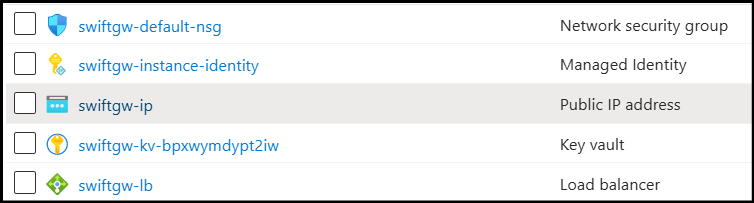
When you select this resource, you will see a public IP address.
Paste this into a web browser and sign in with the webAdminUsername / webAdminPassword from parameters.json. If you left them empty, create the admin account on the Welcome page — see the First Launch Experience.
Start your free trial
A StorageLink BYOL deployment starts unlicensed: administrators can sign in and configure it, but non-administrator users cannot sign in and file transfers are blocked until a trial or license is active. After you sign in, use the Start a 30-day free trial card at the top of the admin UI. The VMs share one database, so a single trial — and later a single license — covers every VM in the scale set; the other VMs pick it up within about a minute. When you are ready to purchase a license, see Purchasing a License.
Default Cloud Connection and Storage Account
After you have created an admin user and logged into the web admin portal, you will be taken to the Folders tab. You will see that the default Cloud Connection is already configured for you. To view or modify the connection edit the / folder, otherwise known as the root folder.
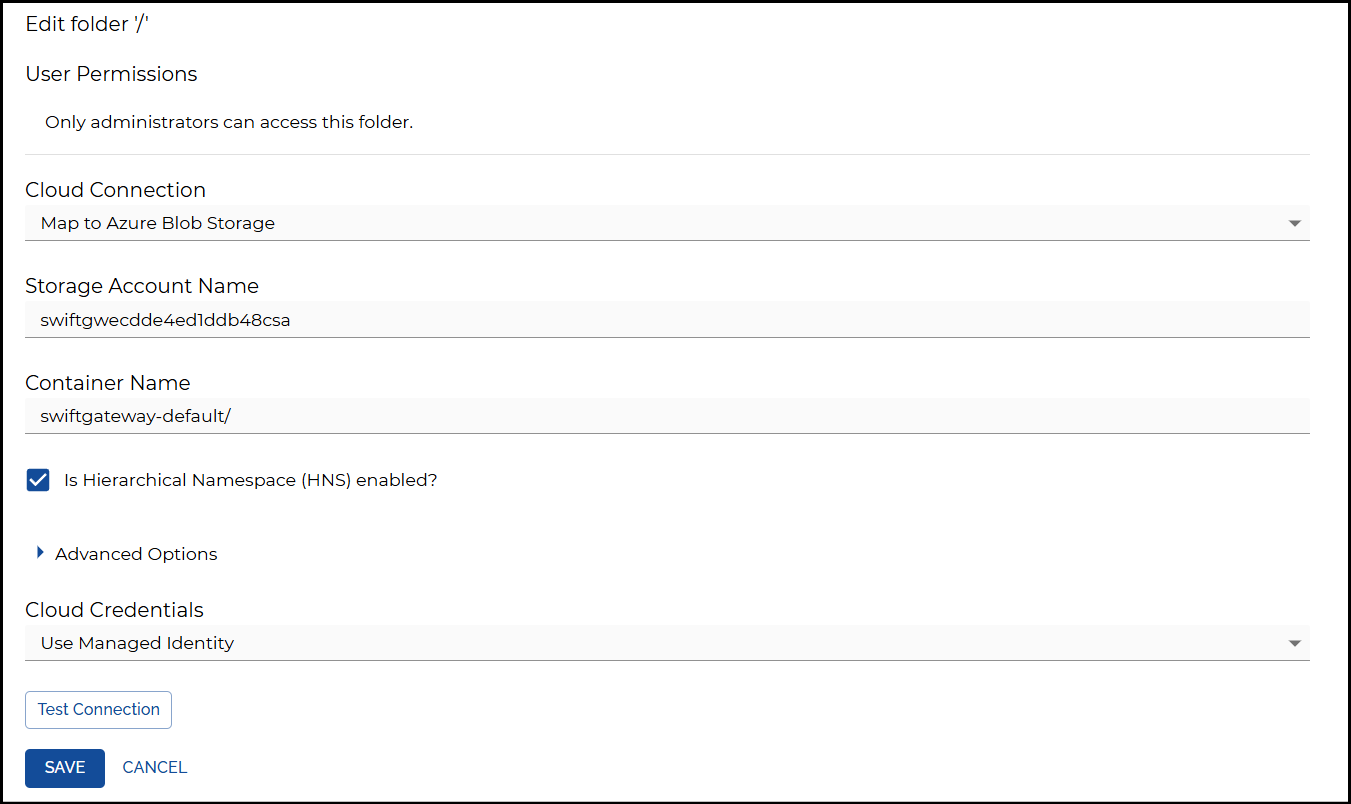
This points to a Container named swiftgateway-default in a Storage Account that StorageLink creates in the resource group when it first starts (its name begins with storagelink). It connects with the VMs' managed identity.
Under the list of resources in the Resource Group, sort the list by Type:
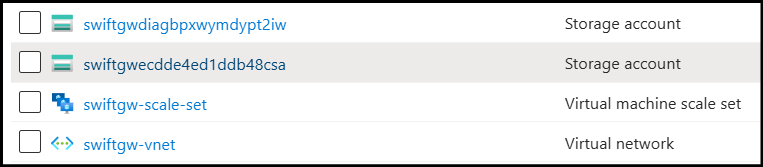
You should see two Storage Accounts, with the following prefixes:
- storagelink: The default Cloud Connection points to this Storage Account. StorageLink creates it on first start.
- swiftgwdiag: This is used for VM diagnostics. The ARM template creates it.
How to SSH into a VM for troubleshooting
Each VM does not have a public IP, so you connect through the Load Balancer's public IP instead. The Load Balancer's inbound NAT pool maps ports 2222–2322 on its public IP to port 22 on each VM: for example, port 2222 reaches the first instance and port 2223 the second.
To list the current mapping, run:
az vmss list-instance-connection-info --resource-group "${GROUP_NAME}" --name swiftgw-scale-set
Then connect with ssh -i private.key -p 2222 azureuser@<load-balancer-public-ip>.
You can also see the mapping in the Azure Portal. Go to the list of resources in the Resource Group, and look for the Load Balancer:
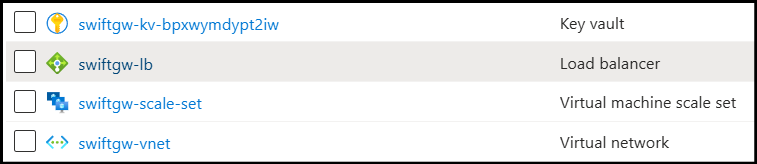
On the left menu, select Inbound NAT rules.
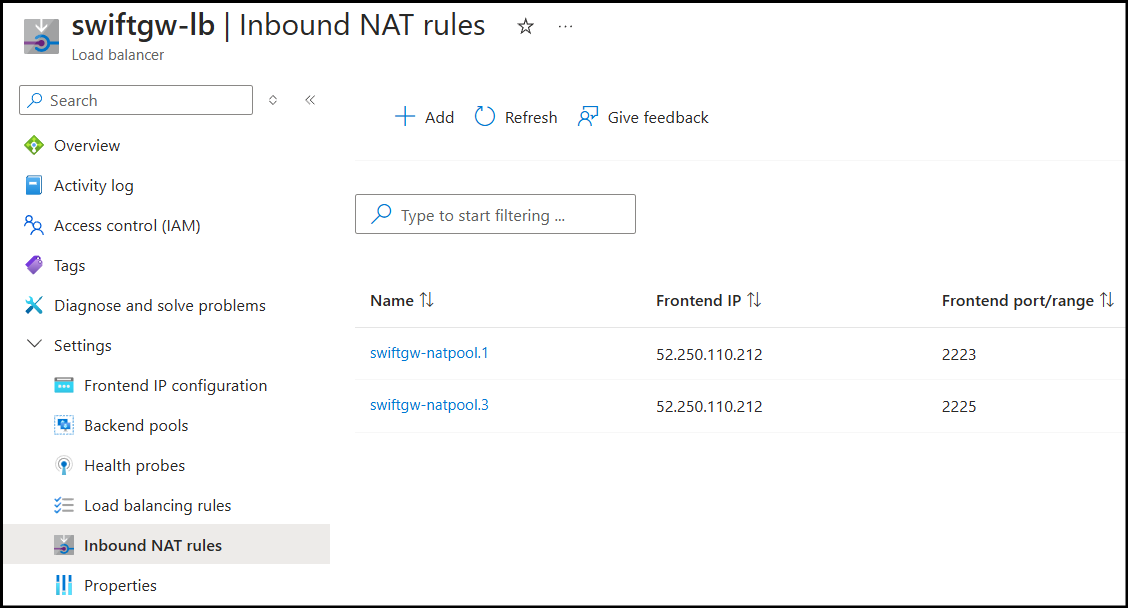
You will see a list of frontend ports, each mapped to port 22 on a different VM.
Deleting the deployment
To remove all resources, delete the resource group:
az group delete --name "${GROUP_NAME}" --yes
Deleting the resource group also deletes the storage account StorageLink created for the default Cloud Connection, and every file in it. Copy anything you want to keep first.
Azure keeps the deleted Key Vault (swiftgw-kv-...) in a soft-deleted state for 90 days by default. To remove it right away, run az keyvault list-deleted --query "[].name" -o tsv to find it, then az keyvault purge --name <key-vault-name>.